

Elave Guardian for MT5
Your plan, on every trade.
A risk co-pilot on your MT5 chart. It sizes your trades and enforces the plan you set. It never trades for you.
Already have an account? Log in to get the EA
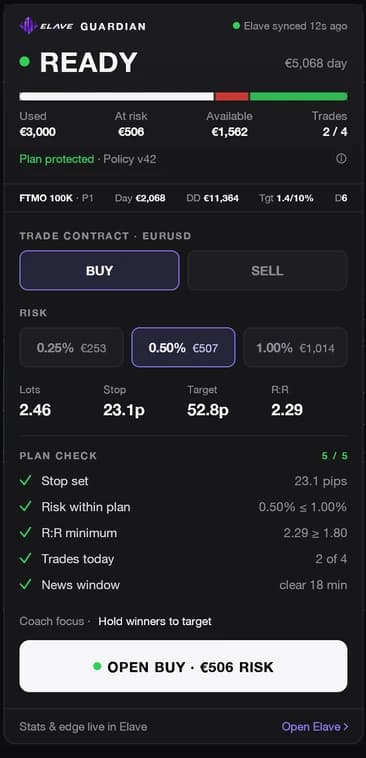
You can trade. Side, risk, lots and a five-point plan check, then one button.
In three lines
Guards your account from the first second
Daily loss, drawdown and news limits apply as soon as it’s on the chart, account or not.
Shows your plan on the chart
Entry, stop and target drawn with the money and R at stake, before you send.
Connects to your journal and coach
Every trade lands in your Elave journal, where your coach and Ask Elave review it with you.
One panel, seven states
No tabs to dig through. The panel changes shape with your situation and always says what you can do next.
Ready
You can trade. Side, risk, lots and a five-point plan check, then one button.
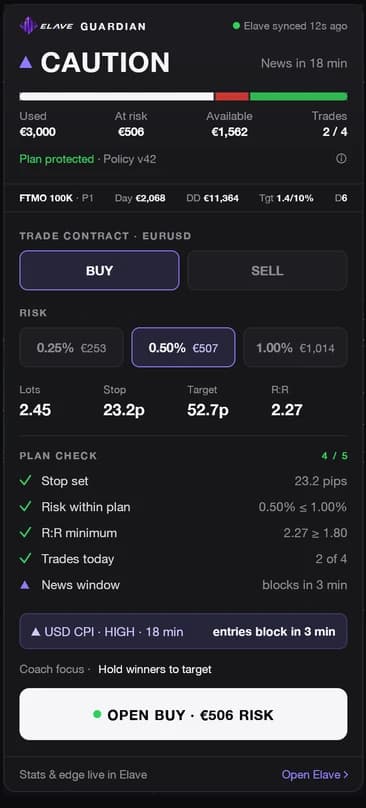
Caution
News is close or most of today’s budget is used. Same ticket, plus the reason and a countdown.
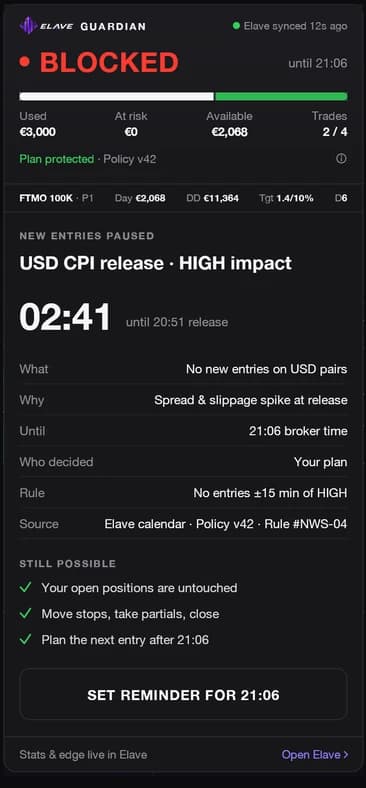
Blocked
A rule pauses new entries: what, why, until when, and what you can still do.
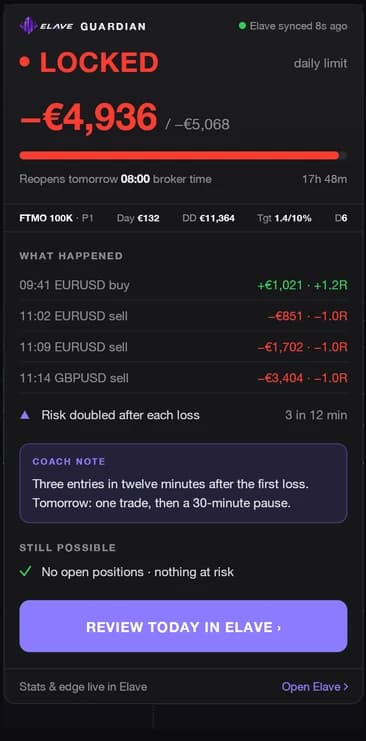
Locked
Daily loss or max drawdown reached. What happened today, a coach note, and the way to review it.
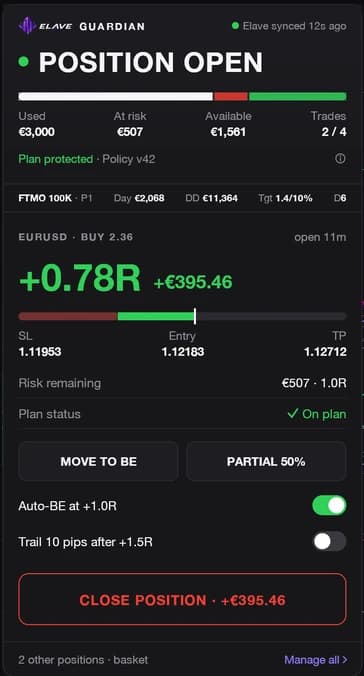
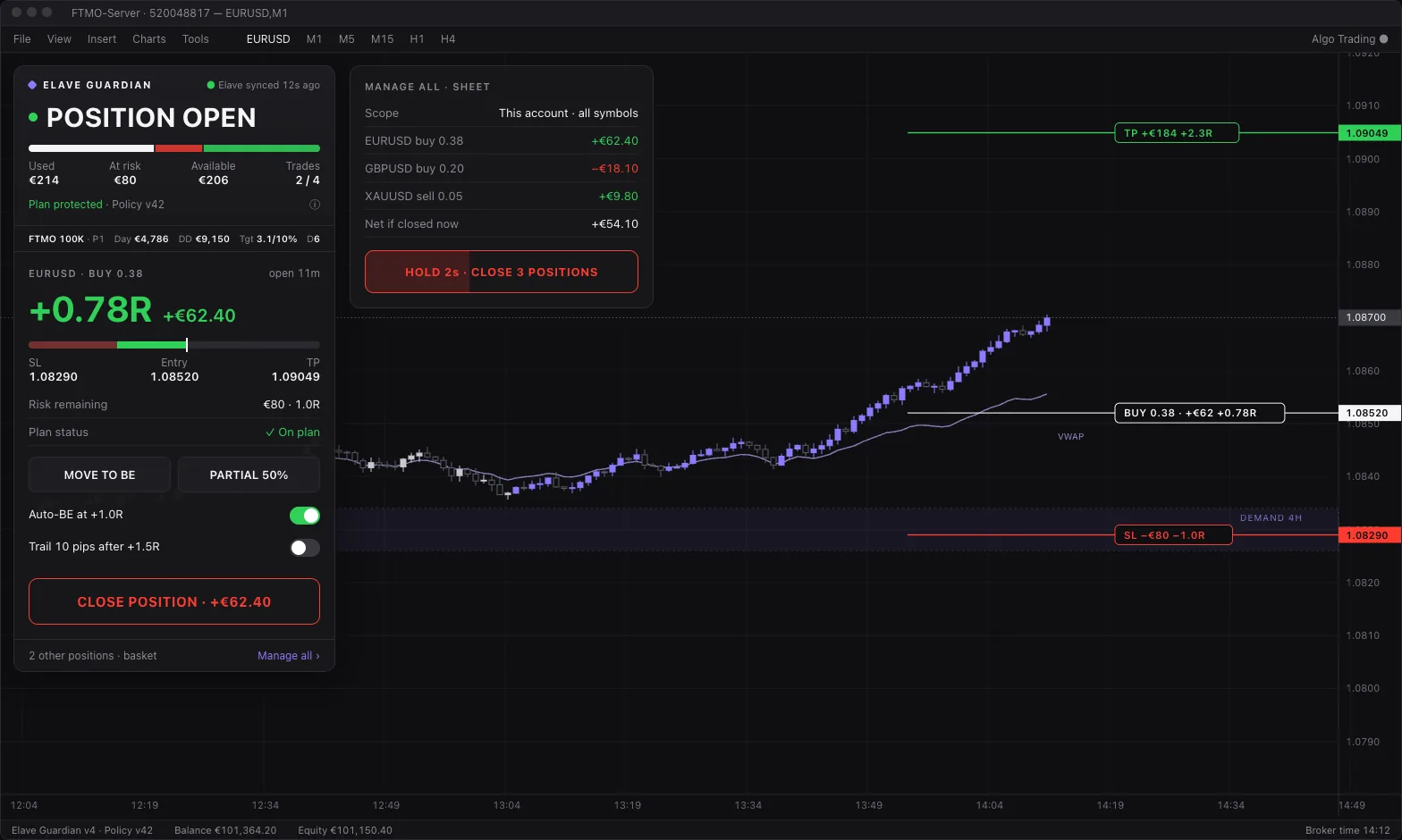
Position open
Manage the trade: R, money, break-even, partial, close, and every other position in the basket.
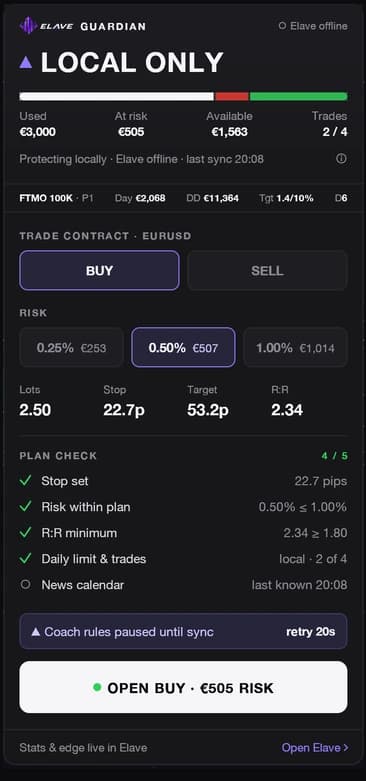
Local only
Elave can’t be reached. Your local rules keep running on the chart until it syncs again.

Collapsed
One slim bar with the one answer, so the chart gets the space.
What it does
Sizes every trade from your stop
Pick your risk, drag the stop. It works out the lots and shows the money at stake before you send.
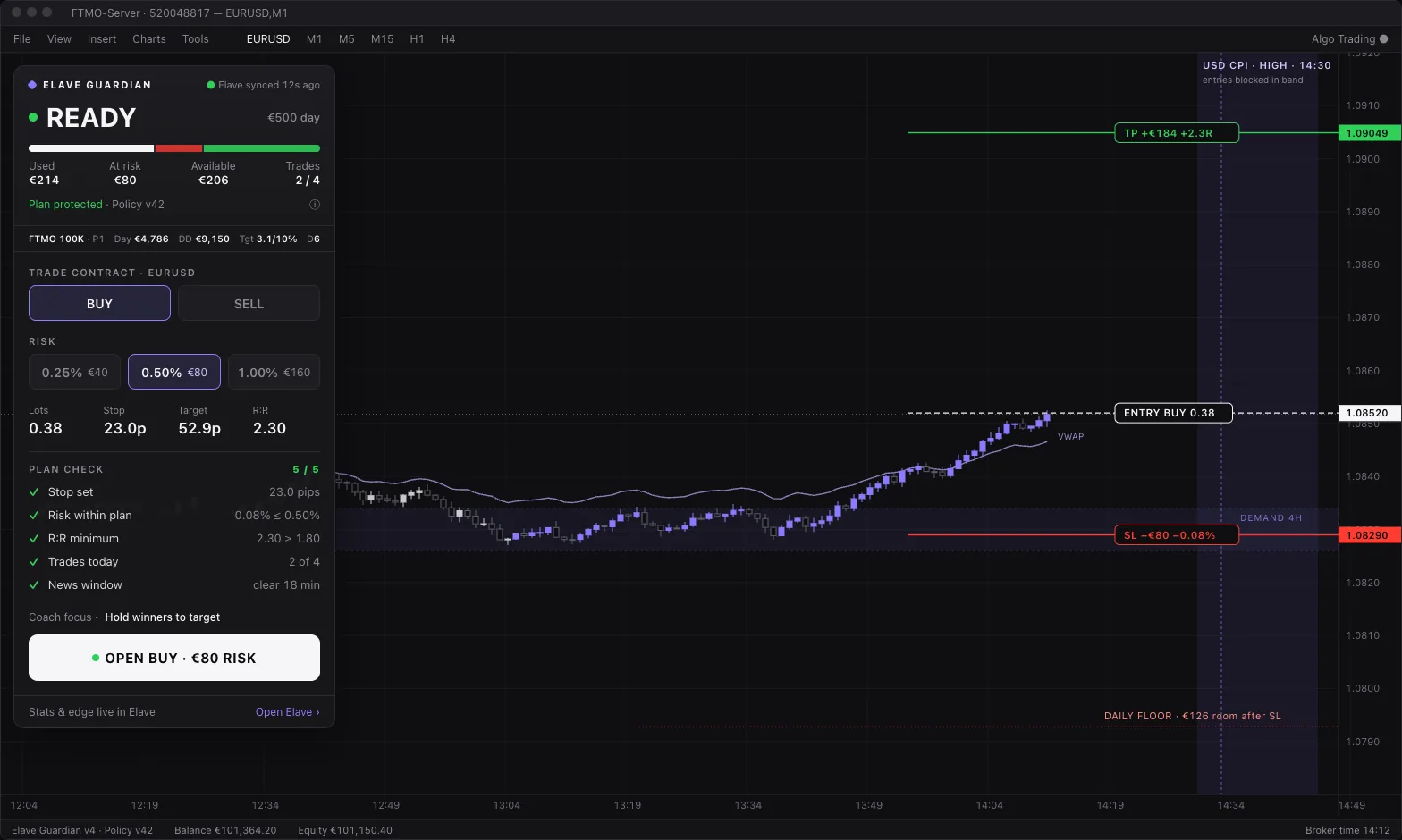
Enforces the plan you set
Daily loss, drawdown, trades per day, prop-firm limits and news windows. When one of your rules is hit, it pauses new entries and tells you until when.
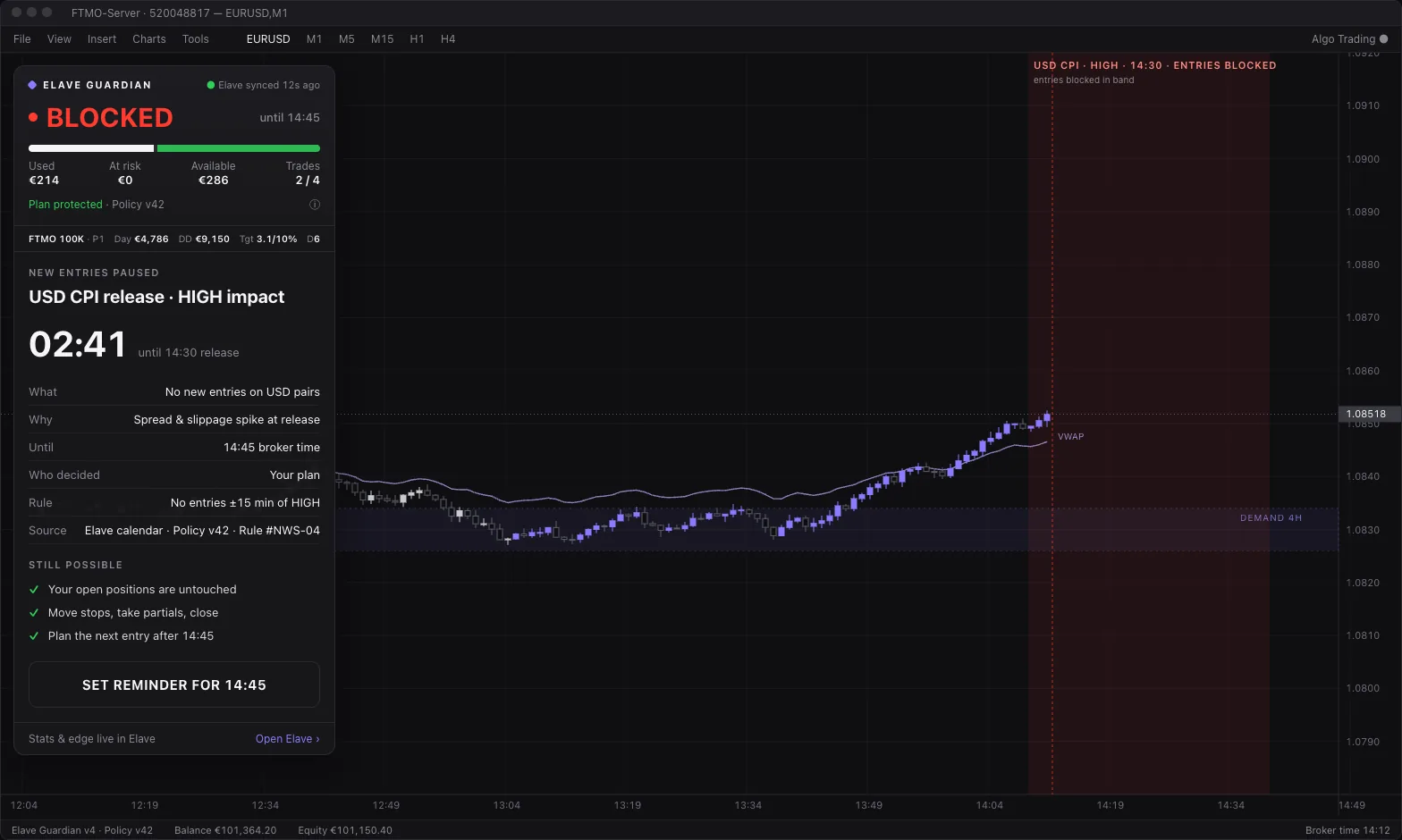
Journals every trade
Each trade lands in your Elave journal on its own, so your coach and Ask Elave see what really happened.
Free, and with the Bootcamp
Free with an Elave account
- Guardian panel and all seven states
- Risk in money, lots from your stop
- Daily loss and drawdown locks
- Journal sync to Elave
- Position manager: break-even, partials, basket
- Multi-chart: one chart leads, the others follow
Included with the Elave Bootcamp
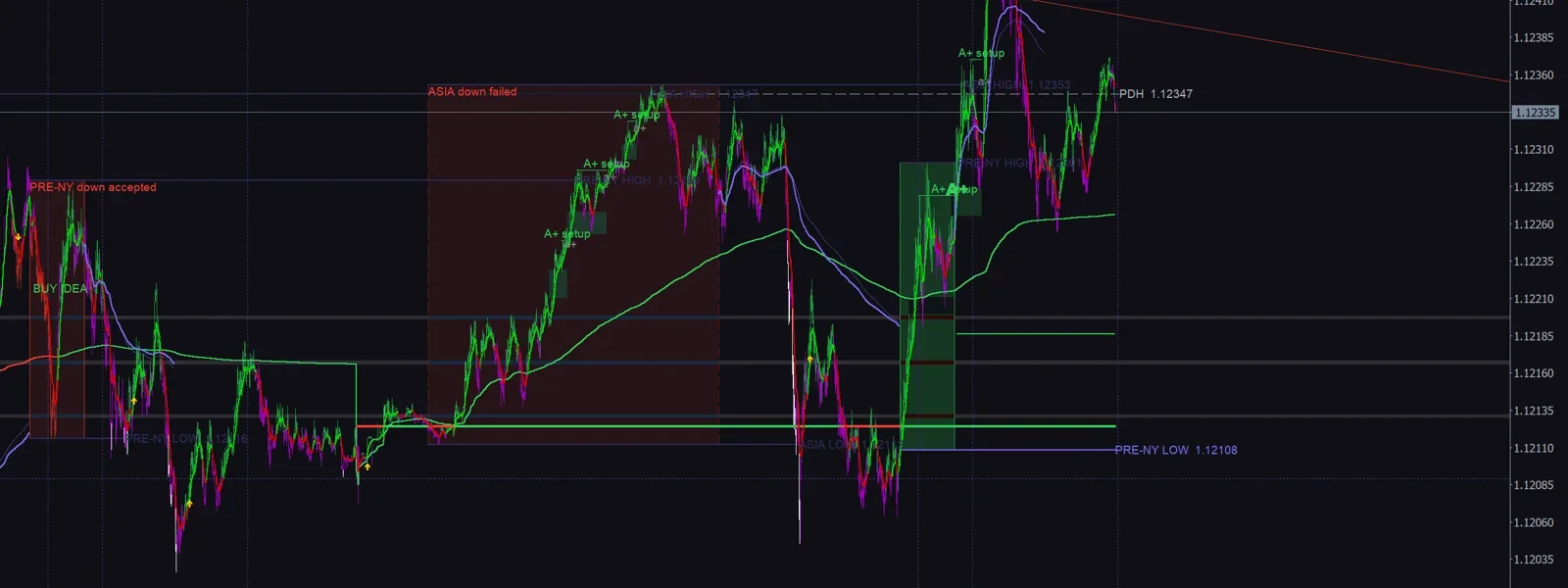
The full ElaveFX indicator, switched on inside the same EA:
- Bias candles
- BUY/SELL ideas and golden triangles
- A+ setups
- Key zones
- Sessions and pre-open ranges
Install in 3 steps
Create your free account
No card. It opens your journal, your coach and your rules.
Download for Mac or Windows
In Elave, open Guardian → Get the EA. The installer puts the EA in MetaTrader 5 and attaches it to a chart.
Connect and set your plan
Enter the code shown in the panel, then pick your prop-firm preset or your own limits: daily loss, risk per trade, news windows.
Questions
Is it a bot?
No. It never opens a trade on its own. Every order is yours; Guardian checks it against your plan first.
Does it run on Mac and Windows?
It runs inside MetaTrader 5. Windows 10 and 11 run MT5 natively. On Mac, MT5 runs through Wine or CrossOver, where we test it most today. Netting accounts get fewer checks than hedging accounts.
How safe is it?
Guardian enforces the plan you set on the entries you place from MT5. It can’t see orders sent from your phone or web terminal, and it doesn’t make trading safe: you can still lose money. Alerts depend on your account syncing and can arrive late or not at all. Your firm’s dashboard is the official record. Always check it before you trade.
What happens to my data?
Without an account, sizing and Guardian run on your chart only. Once you connect, your trades sync to your private Elave journal. You can disconnect at any time; past trades stay in your journal.
What is free, and what comes with the Bootcamp?
Free with an Elave account: sizing, Guardian, journal sync and Ask Elave. The Elave indicator on your chart is included with the Elave Bootcamp, by application.
Can it close my trades?
Not on its own. When a rule is hit, Guardian pauses new entries; your open positions stay as they are. Moving a stop, taking a partial or closing stays possible during every lock.
Does it work offline?
Yes. If Elave can’t be reached, the panel switches to Local only and keeps your local rules on the chart. Your journal catches up when the connection is back.
How many accounts and charts?
Use it on every MT5 account you link to your Elave account, and on as many charts as you like: one chart runs Guardian, the others follow it.
Start with your plan.
Create your free Elave accountAlready have an account? Log in to get the EA
Download the Guardian preview (v3.50 beta)Preview build — use a demo account first.
You can lose money trading, sometimes more than your deposit. Elave helps you follow your own rules. It doesn’t make trading safe.