

Prop firm risk management: size, daily stop and news rules on MT5.
Prop firm risk management means sizing each trade from the room left before your firm's daily loss and maximum drawdown limits, and stopping before a breach. Elave Guardian does this on MetaTrader 5: your rules warn or hold each entry first. It never opens a trade on its own; at your prop firm's daily limit it closes open trades.
Arnau Lavernia · Founder of Elave · Last updated:
Elave Guardian on MT5
Every entry checked before the click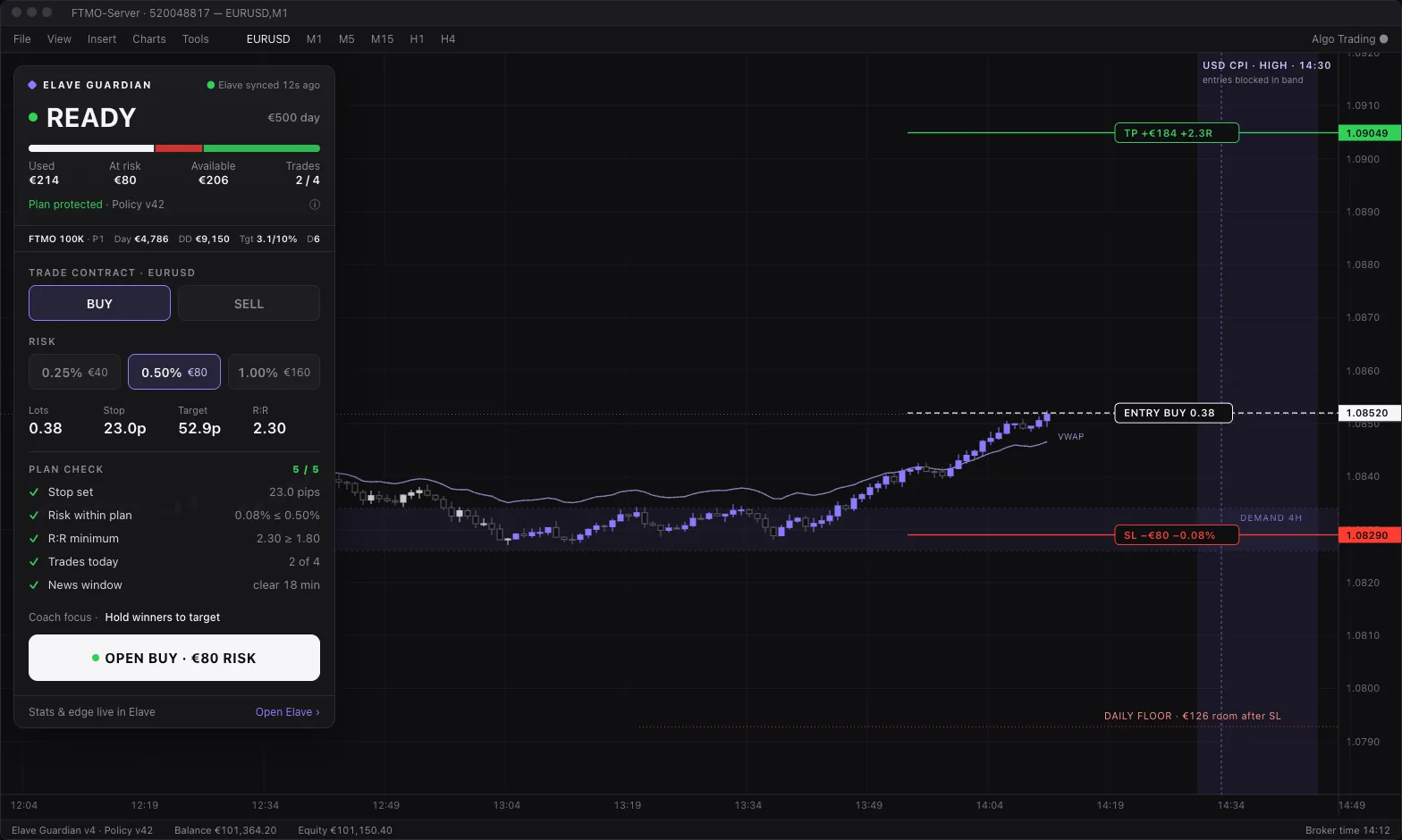
What Elave Guardian does on MT5
| Feature | What it does | Access |
|---|---|---|
| Your rules, before the click | Every entry is checked against your plan. Each rule either warns or holds the entry. | Free · MT5 |
| Two modes | Guardian holds entries that break a hold rule; Unlimited turns those holds into warnings. You choose; neither is pre-selected. | Free |
| Override with a reason | Place a held entry anyway and the reason is logged. From the third override in a day, new entries are held until tomorrow. | Free |
| Stop for today | One tap ends your trading day, on the web or in Telegram. | Free |
| Daily room | What you have used, what is at risk in open trades and what is still available today. | Free · MT5 |
| Firm limits | Limits come from your firm's published rules. At the daily limit Guardian closes open trades; a max-drawdown lock survives a restart. | Free · always on |
| Sizing on the chart | Risk in money, lots worked out from your stop and a plan check on the panel. You click to send. | Free · MT5 |
| News | A strip of upcoming high-impact news, and an optional gate that refuses new entries around it. | Free · gate off by default |
Which rules end most prop firm accounts?
Almost every evaluation ends on a rule, not on the profit target. Know these four for your exact account before the first trade:
- Daily loss limit: how much you may lose in one day, and whether it counts balance, equity or both.
- Maximum loss: static, trailing intraday, or trailing at the end of the day.
- News restrictions: windows around high-impact releases where opening, or holding, is not allowed.
- Consistency rules: a cap on how much of your total profit one day may represent.
What happens when I hit the daily loss limit?
It depends on the firm, so read the exact consequence on your firm's rule page. At many firms a breach fails the evaluation or ends the funded account, and the day runs from the firm's reset time, not yours.
On MT5, Guardian acts at that line. It never opens a trade on its own; at your prop firm's daily limit it closes open trades. Stop for today, one tap on the web or in Telegram, tightens your rules until the firm's next daily reset.
How do I size from the room left, not the balance?
Your real account is the distance to the nearest limit, not the balance on the screen. Each morning, take the smaller of the room before the daily loss limit and the room before the maximum loss, then risk a fixed, small share of that on each trade.
Size from your stop: the money you are willing to lose divided by the stop distance gives the lot size or contract count. As the room shrinks after a loss, the size shrinks with it, so a losing streak slows down instead of speeding up.
How far inside the firm's limit should my daily stop be?
Far enough that one more full-size loss after you reach it still leaves room before the firm's limit. Slippage, a gap or a late fill can take a trade past its stop, and the firm counts what was filled, not what you planned. Your personal stop is the line you choose; the firm's limit is the line that ends the account.
What should a risk-manager EA do, and never do?
- Do: check each entry against your plan before it reaches the market, show the room left today, and end the day when you ask it to.
- Do: enforce the firm's hard limits even when you are not watching.
- Never: open trades on its own or run a strategy for you.
- Never: promise you will pass. Rules reduce the ways an account can fail; they don't create an edge.
Free MT5 risk management EA for prop firms.
Elave Guardian is a free MT5 risk management EA, included with an Elave account: no card, no subscription. Guardian, on-chart sizing and the journal all come with the account. On Windows the Elave Connector installs the EA; on a Mac you add the file by hand. The Elave indicator inside the EA is included with the Elave Bootcamp.
How do I stop breaking prop firm rules?
Move the rules from memory onto the chart, where they are checked the same way after a losing streak as on a good day.
- Set a personal daily stop inside the firm's limit, and stop for the day when you reach it.
- Size every trade from the room left, not from the balance.
- Make your platform hold entries that break your plan. On MT5, Guardian checks each entry before the click.
- Give a reason for every exception. Guardian logs each override, so a broken rule leaves a trace.
How Elave Guardian works
Guardian is part of the Elave EA for MetaTrader 5. You write your rules once: a daily budget, a maximum risk per trade, a stop on every trade and more. Each rule either warns or holds an entry. In Guardian mode, hold rules hold; in Unlimited mode they only warn. You choose the mode yourself.
A held entry can still go through: override it and give a reason, which is logged. From the third override in a day, new entries are held until tomorrow. Stop for today ends the day in one tap, from the web or from Telegram.
Your firm's limits are separate from your rules. They come from the firm's published rules, they are always on, and at the firm's daily limit Guardian closes open trades. It never opens a trade on its own. A max-drawdown lock survives a restart of MetaTrader.
On-chart enforcement runs on MT5 only. On Windows the Elave Connector installs it; on a Mac, MetaTrader 5 runs through Wine or CrossOver and you add the EA file by hand. Netting accounts get fewer checks than hedging accounts.
Can I stop trading at the daily loss limit on Topstep or Apex?
Not with Guardian. Its on-chart checks run on MetaTrader 5 only, and futures prop accounts such as Topstep or Apex trade on futures platforms. Set a daily loss limit in the platform you trade on, below the firm's, where the platform offers one.
Elave still helps after the session: TopstepX accounts and NinjaTrader 8 accounts, including Tradovate and Rithmic connections, sync into the free journal for review.
Prop firm daily loss and drawdown alerts on Telegram.
Link Telegram to your Elave account and the desk watches each prop limit on the firm's own basis and trading day:
- Prop-limit alerts: a warning at 50% of the daily loss or overall drawdown limit, and critical alerts at 80% and 100% that cannot be muted.
- /room: the room left before each prop limit.
- Stop for today, from the chat.
Risk management for funded accounts.
Funded accounts usually keep the evaluation's daily loss and maximum loss limits, and some firms apply extra rules, such as a consistency rule, only at payout. Read the funded-phase rules on your firm's page; they can differ from the evaluation.
Keep the same personal daily stop and the same sizing from the room left. The Payouts manager records each withdrawal with its evidence, next to the account's firm, phase and size.
How do I manage risk across several prop accounts at once?
Treat accounts that take the same trade as one position. The same setup on three accounts is one decision at three times the size, and a bad day hits all three. Size each account from its own room left and keep a daily stop per account.
Elave's journal shows every account side by side, each in its own currency. Planning across your own prop accounts comes with the Elave Bootcamp.
Is a risk-manager EA allowed by my prop firm?
Rules on Expert Advisors differ by firm, and they change. Elave makes no blanket claim and no firm has approved Guardian. Read your firm's own rules on automation before you attach any EA; Elave's prop firm directory links each rule to the firm's official page.
Are correlated positions one risk?
Usually, yes. A long on the S&P 500 and a long on the Nasdaq 100 tend to move together, so a bad open hits both. Count correlated positions as one trade when you size against the daily limit.
Willpower vs rules on the chart
A written plan only helps if it is still followed after the third loss of the day. The difference is where the rule lives.
| Criterion | Rules in your head | Rules on the chart (Guardian) |
|---|---|---|
| When it is checked | When you remember | Before every entry |
| After a losing streak | Easiest to bend | Same check, every time |
| Breaking a rule | Leaves no trace | Needs a reason, which is logged |
| Firm's daily limit | You watch it | Closes open trades at the limit |
| Ending the day | A promise to yourself | Stop for today, one tap |
FAQ
What is prop firm risk management?
Sizing every trade from the room left before your firm's daily loss and maximum drawdown limits, keeping a personal daily stop well inside the firm's, respecting news windows, and counting correlated positions as one risk. The goal is to never let one day decide the account.
Does Elave Guardian open or close trades?
It never opens a trade on its own; at your prop firm's daily limit it closes open trades. Orders from its on-chart panel are sent only when you click. Your own rules act on new entries: they warn or hold them.
Can I override a Guardian rule?
Yes. A held entry can go through if you give a reason, and the reason is logged. From the third override in a day, new entries are held until tomorrow. Firm limits cannot be overridden.
Is Elave Guardian a free drawdown protection EA?
It is a free drawdown guard for MetaTrader 5, with no card and no subscription, but no EA makes trading safe. Its max-drawdown lock survives a restart until the Elave desk clears it. Slippage can still fill a trade past a limit, so keep your own daily stop inside the firm's.
Does Guardian work on MT4, cTrader or futures platforms?
No. On-chart enforcement runs on MetaTrader 5 only. Other platforms can still sync to the Elave journal, and the Telegram desk can show the room left before each prop limit.
Where do Guardian's firm limits come from?
From the prop firm's published rules. Elave's prop firm directory lists each rule with its source and whether it has been verified. Always confirm the current rules on the firm's own site, because they change.
Is a risk-manager EA allowed by my prop firm?
It depends on the firm. Rules on Expert Advisors differ and change, and no firm has approved Guardian. Read your firm's automation rules before attaching any EA.
Related
- Elave Guardian for MT5The product page: install, panel, rules.
- Prop firm risk calculatorLots or contracts from your max loss and stop.
- Trailing drawdown explained
- Consistency rule explained
- How prop firm challenges work
- Prop firm rules directory
- Prop firm rules compared
- Free trading journal
- AI trading coachTurn a measured habit into a Guardian rule.
- Daily loss limit explained (prop firms)
- Prop firm news trading rules explained
- Trade copier for prop firms: what is allowed
- Prop firm challenge checklist
- Trading guides, rules and tools
Get started
Free with an Elave account. MetaTrader 5 only.
Free, no card.
Educational content, not investment advice. Elave makes no performance, win-rate, pass-rate or income claims. Trading leveraged products carries a high risk of loss.